Crafting Delightful Digital Experiences
DonutStudio ships two ways: a complete free standalone DAW, and as a VST3 and CLAP plugin you drop straight into the DAW you already use. Either way the harmonic-link tuning comes with you. VST3 note expression carries DonutStudio's exact ratios into the host. The standalone gives you a complete traditional workstation: a clip-based arranger with audio and MIDI clips, the freeform harmonic piano roll, MIDI and audio recording, automation, third-party plugin hosting, and Airwindows plus DonutStudio's own Donut Devices. The video editor is free too. Pro adds per-note sampling, vocals, and the score-reactive Media Machine.
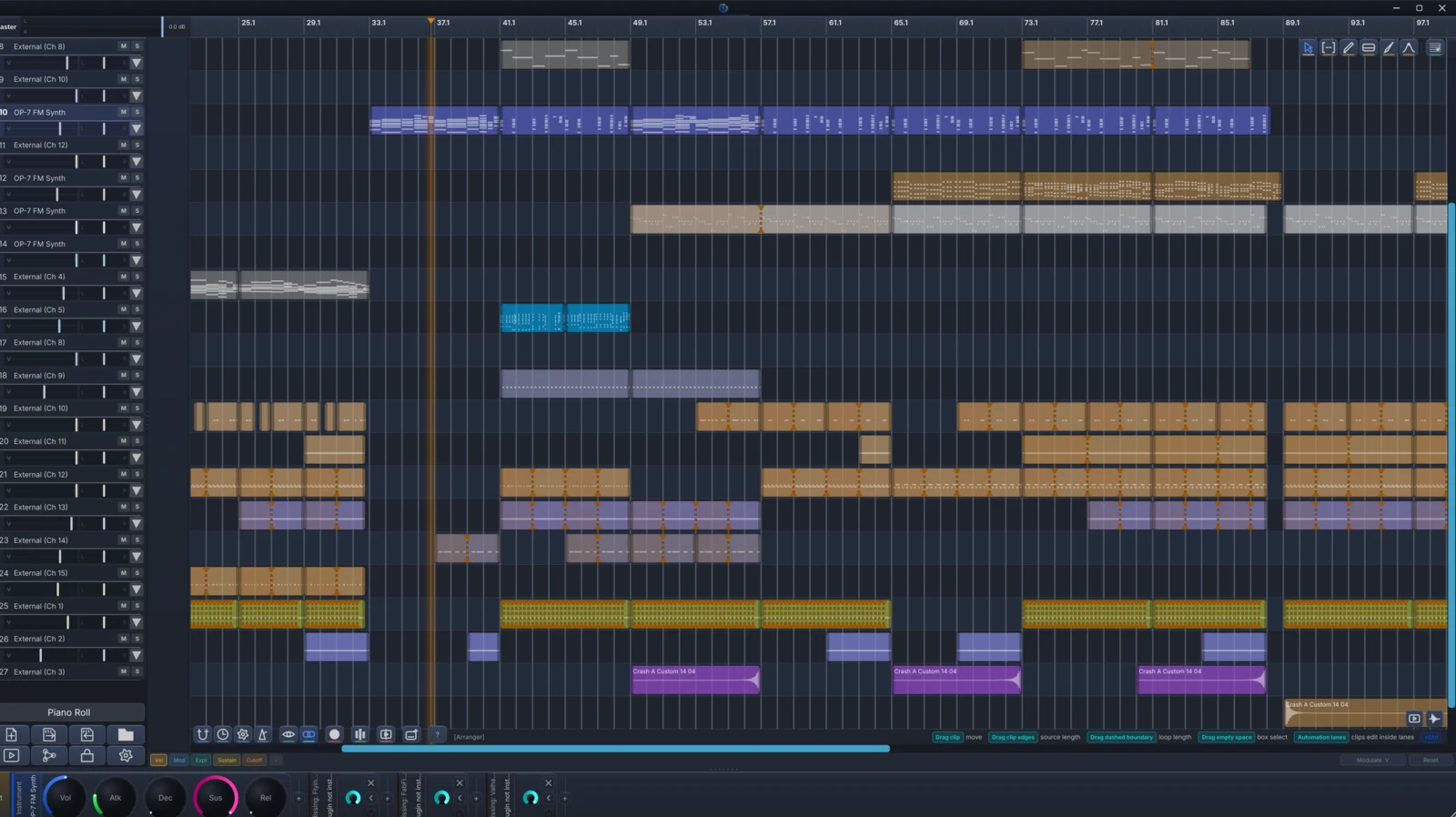
DonutStudio gives you a real clip arranger that keeps its free-flowing composition philosophy. Clips are emergent: you never make an empty clip first, and a clip comes into existence the moment a scissor cut creates a boundary. Tracks are unified, so an audio clip and a MIDI clip live on the same lane, and the whole arrangement shares one ruler with the piano roll.
Cut, move, loop, and rearrange audio clips and MIDI clips on unified tracks. Convert an audio clip into a MIDI clip with per-note samples in place, tunable by harmonic links.
You skip the empty-clip ceremony: write freely, then cut where you want boundaries. Dissolve clips back into freeform MIDI to keep composing, then slice it a new way.
Tab between the arranger and the piano roll. They share the ruler, playhead, and horizontal zoom, so you stay at the same spot in the song at a different altitude. Pop either out onto a second monitor.
Arm a track, set your count-in bars, and hit play. DonutStudio captures the input as a clip on the beat-locked timeline, ready to cut, move, and tune like any other clip. Both MIDI recording and audio clip recording are free.
You can also arrange right on the piano roll. Loop squares are still there. Draw a loop around material and extend it across bars, with links continuing across the repeats.
CC and plugin automation is clip-owned data: cut carries it into the clip, loop repeats the curve, and dissolve burns it back into the timeline.
Per-note sampling is part of DonutStudio Pro. Attach any audio file to any note on the piano roll. A vocal, a guitar take, or a field recording becomes a first-class citizen in the harmonic graph, pitch-shifting by pure ratios alongside synthesized instruments.
Drag a WAV onto a note. The sample plays at the note's pitch and follows its envelope, with varispeed pitch modulation locked to pure ratios in real time so it holds its place in the harmonic graph.
Drop in a recorded vocal and DonutStudio analyzes it with the WORLD vocoder, then resynthesizes it under a dedicated vocal pitch editor. Pull each note's contour onto its target JI ratio and the recording follows the harmonic graph.
Create a 3:2 link on a sample-backed note and the audio pitch-shifts to match in real time, using the same system as synth notes.
Render all the transformations down to a clean WAV. A shared sample pool caches by reference, so the same file used by ten notes costs no extra memory.
Export anywhere
The hard part of exporting microtonal music is keeping the tuning, and DonutStudio keeps it. Standard MIDI carries your just-intonation as MPE-style per-note pitch bend, so it lands intact in any DAW that reads it, and DAWproject moves whole arrangements between DAWs with the microtuning carried through. Bounce audio to WAV, MP3 (lame), or Opus (libopusenc). The native .arbit format is the only one that keeps the full harmonic graph: links, roots, pitch-bend and vibrato curves, pan, fades, and per-note audio.
.arbit
DonutStudio's whole point is exact just-intonation tuning, so it holds that tuning all the way to the project boundary.
Run DonutStudio as an instrument inside your DAW. Per-note microtuning rides out on VST3 note expression, so the harmonic relationships you drew survive into the host's mixer and render.
Point your other soft-synths at DonutStudio and they retune to its scale in real time, or let DonutStudio receive tuning from an MTS-ESP master, so each session has one source of tuning truth.
Standard MIDI export writes MPE-style per-note pitch bend, so the JI tuning lands intact in any DAW that reads it.
Load third-party VST3 and CLAP instruments and effects inside DonutStudio, and drop them into the modular node graph as nodes with their GUIs embedded right in the patch. Hosting can run out-of-process, so a crashing plugin goes down on its own while your session keeps running. (Out-of-process sandbox is in beta.) If you work in Bitwig, DonutStudio's Bitwig bridge sends your note data straight across (send-only, beta).
DonutStudio lives inside your DAW for free and routes tuned MIDI to your existing instruments. It auto-detects the best channel available: VST3 note expressions in Bitwig and Reaper, CLAP per-note pitch where supported, MPE channel rotation in MPE-aware hosts, and per-channel pitch bend as a fallback for Ableton, FL, and Studio One.
VST3 + CLAP. Native VST3 note expressions for sample-accurate per-note pitch. Transport follows the host automatically.
VST3 + CLAP. Native VST3 note expressions deliver per-note pitch independent of the bend wheel. Behaves like a first-class CLAP citizen.
VST3. Per-channel MIDI pitch bend carries microtuning to any compatible synth. MPE-aware instruments get rotation automatically.
VST3. Per-channel pitch bend carries microtuning to your DAW instruments. Drop DonutStudio on a pattern, route to your favorite synth, and tuning follows the notes.
VST3. Pitch bend channels deliver microtonal note streams to any plugin.
DonutStudio Free also runs standalone with expandable tracks, the sound engine, and audio export. It hosts your own VST3 and CLAP plugins (instruments and effects) and ships with the Airwindows suite built in. Hosted plugins can run sandboxed out-of-process (beta), so if one crashes it doesn't take DonutStudio down with it. Pro adds per-note sampling and vocals.
Free includes the clip arranger, audio and MIDI clip editing, instruments, effects, VST3 hosting, the video editor, and export. Pro adds sampling, vocals, and the score-reactive Media Machine.